By default, Nexconn does not save your message history, but we provide options to do so.
For mobile clients
You can get history messages from the local database, from the server, or from both.
To get history messages from the server, you need to enable Cloud Storage for One-to-One and Group Messages or Cloud Storage for Community Channel Messages. You can enable these services by subscribing Chat Starter/Pro plan.
For the server
There are two ways to get message history from the server:
Option 1: Query message history logs
You can use query message history API. Retrieve message history for a channel within a specified time range. Typically used by app administrators for backend message search.
Notes:
-
Time range: Up to 14 days per query.
-
Sort order: Messages are sorted by timestamp in descending order.
-
For more details, see the documentation: Query Direct Message History.
Option 2: Message Sent Webhook
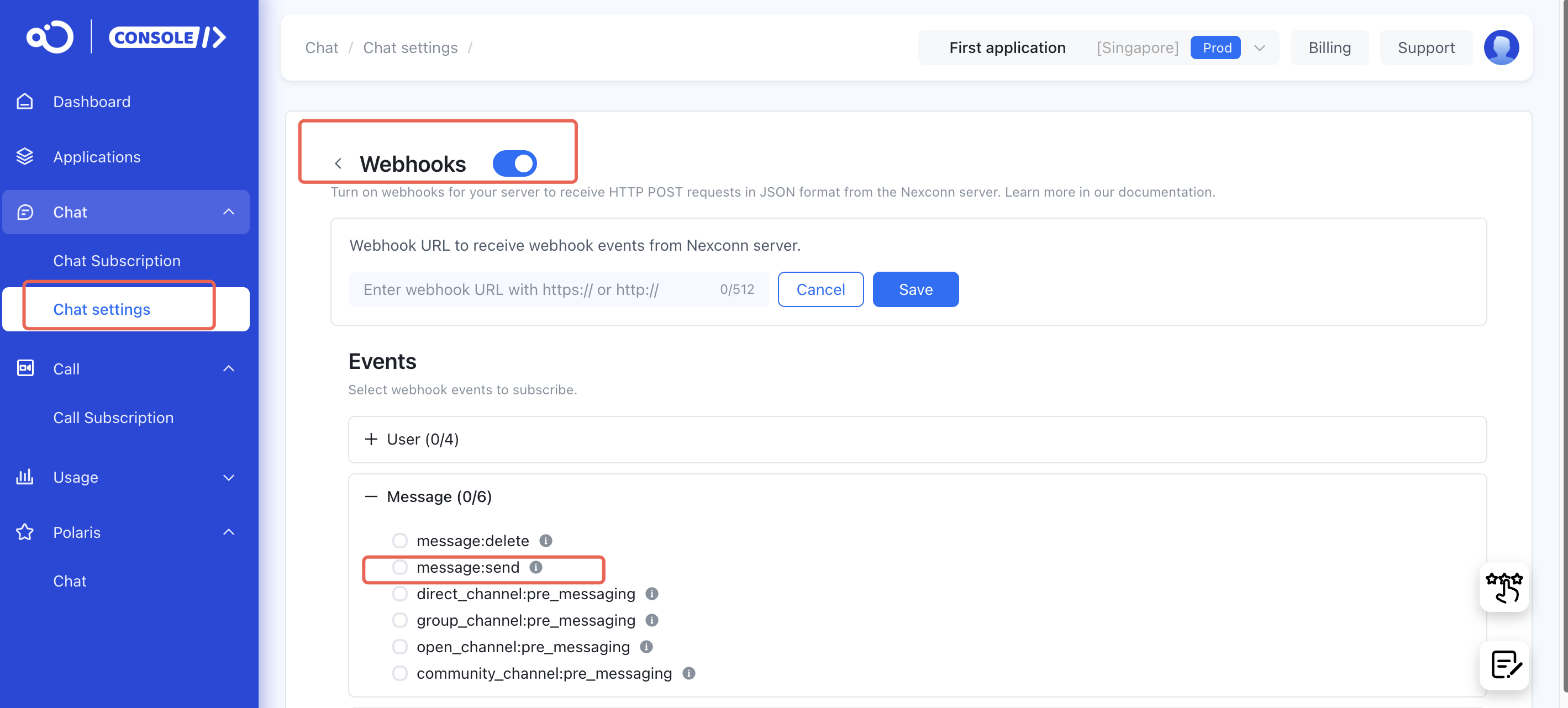
You can enable the Message Sent Webhook service on the Chat settings. We will then sync all message data to your specified application server, where you can store it yourself.
Notes:
-
When enabling this service, make sure to configure a valid and accessible callback URL.
-
If your server’s response to a callback request times out (5 seconds), our server will retry twice. If it still fails, the status for that message will not be synced.
-
For more details on limitations and other considerations, see the documentation: Message Sent Webhook.
If you have any questions, feel free to create a ticket to us.